// Calc-U 59 — Help site pages
// User scope: this guide explains the EMULATOR APP, not the underlying
// TI-59 calculator hardware. Pages here are intentionally light on prose;
// they exist as scaffolding for the eventual content.

const { useState: useStateApp } = React;

/* =============================================================
   HOME — overview page; the only page with substantive copy.
   ============================================================= */
function HomePage({ onNav }) {
  return (
    <main>
      {/* Hero */}
      <section style={{ borderBottom: "1px solid var(--stroke)" }}>
        <div className="wrap" style={{
          display: "grid", gridTemplateColumns: "1.1fr auto", gap: 64,
          alignItems: "center", paddingTop: 56, paddingBottom: 56,
        }}>
          <div>
            <p className="eyebrow">User guide</p>
            <h1 className="page-title">Calc-U <em>59</em></h1>
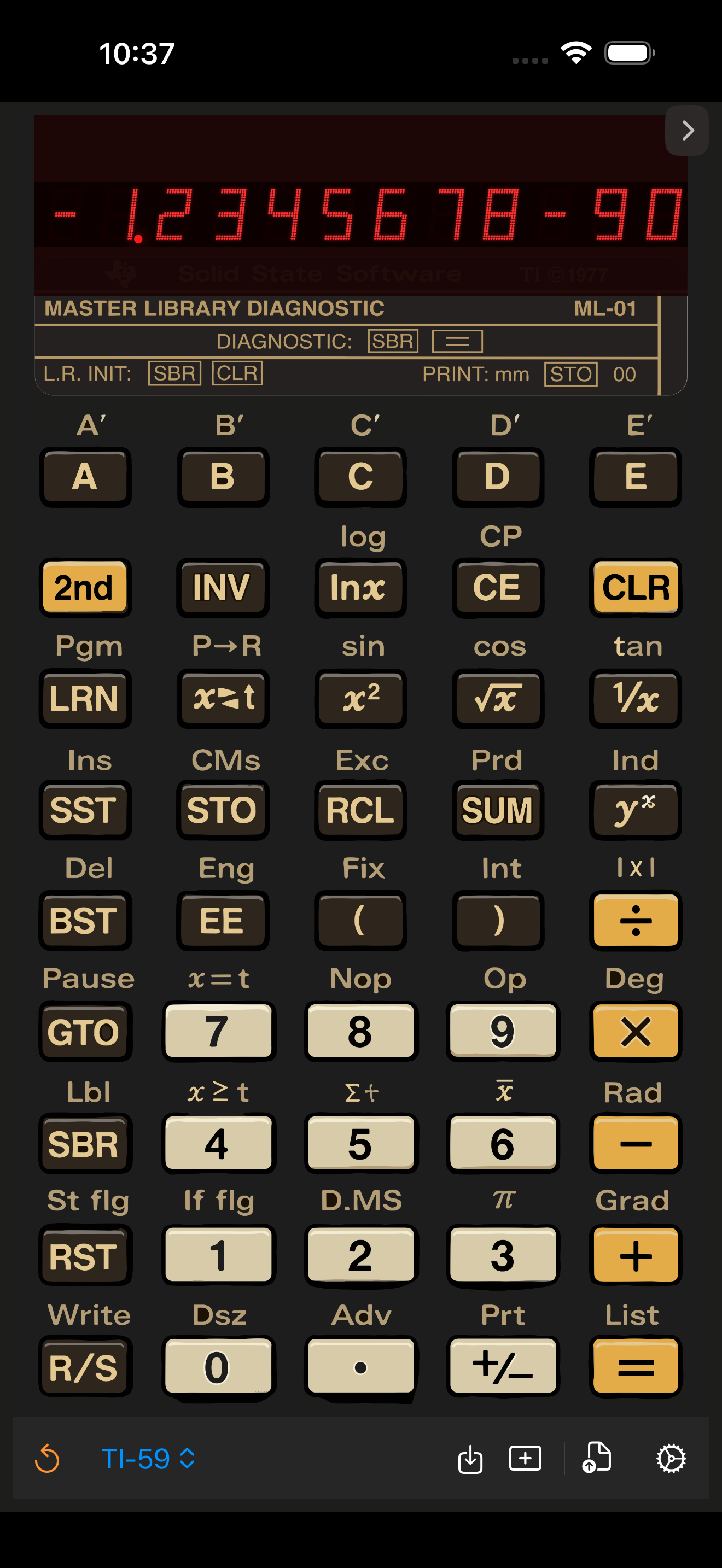
            <p className="lede">A TI-59 emulator for Mac, iPhone, and iPad. This site is the user guide for the <strong style={{ color: "var(--fg)" }}>app</strong> — how to load modules, save programs, share state across devices, and use the toolbar — not for the original 1977 hardware.</p>
            <div style={{ display: "flex", gap: 12 }}>
              <button className="btn primary" onClick={() => onNav("start")}>Getting started <span style={{opacity:.5}}>→</span></button>
              <button className="btn secondary" onClick={() => onNav("ref")}>App reference</button>
            </div>
          </div>
          <div style={{ display: "flex", justifyContent: "center" }}>
            <img
              src="assets/app-screenshot.png"
              alt="Calc-U 59 running on iPhone"
              style={{
                height: 620,
                width: "auto",
                display: "block",
                borderRadius: 44,
                boxShadow: "0 10px 40px rgba(0,0,0,.7), 0 0 0 1px rgba(255,200,100,.06)",
              }}
            />
          </div>
        </div>
      </section>

      {/* Topic cards */}
      <div className="wrap">
        <h2 className="section">Where to start</h2>
        <div style={{ display: "grid", gridTemplateColumns: "repeat(3, 1fr)", gap: 16 }}>
          <TopicCard num="01" eyebrow="Setup" title="Installing the app" onClick={() => onNav("start")}>
            App Store links for macOS, iOS and iPadOS, plus the minimum OS versions and storage requirements.
          </TopicCard>
          <TopicCard num="02" eyebrow="Setup" title="iCloud & sharing" onClick={() => onNav("start")}>
            How Calc-U 59 syncs programs and module state between devices.
          </TopicCard>
          <TopicCard num="03" eyebrow="UI" title="The bottom toolbar" onClick={() => onNav("ref")}>
            What the <strong>undo</strong>, <strong>module picker</strong>, <strong>import</strong>, <strong>new</strong>, <strong>share</strong> and <strong>settings</strong> buttons do.
          </TopicCard>
          <TopicCard num="04" eyebrow="Modules" title="Loading a module" onClick={() => onNav("modules")}>
            Picking a library, viewing the program list, and what each module offers.
          </TopicCard>
          <TopicCard num="05" eyebrow="Programs" title="Save / load / share" onClick={() => onNav("start")}>
            Where user programs live on disk, and how to share them as files.
          </TopicCard>
          <TopicCard num="06" eyebrow="Help" title="FAQ" onClick={() => onNav("faq")}>
            Common questions about behavior that differs from a real TI-59.
          </TopicCard>
        </div>

        {/* App-icon strip */}
        <div className="panel" style={{
          marginTop: 48, display: "flex", alignItems: "center", gap: 24,
        }}>
          <img src="assets/app-icon.png" alt=""
               style={{ width: 80, height: 80, borderRadius: 18, flex: "0 0 auto" }}/>
          <div>
            <h3 className="sub" style={{ margin: "0 0 4px" }}>Available now</h3>
            <p style={{ margin: 0, fontSize: 14 }}>
              macOS 14+ · iOS 17+ · iPadOS 17+. Free, ad-free, open source on
              {" "}<a href="https://github.com/tinue/Calc-U-59">GitHub</a>.
            </p>
          </div>
        </div>
      </div>
    </main>
  );
}

/* =============================================================
   GETTING STARTED — scaffolding only
   ============================================================= */
const STARTED_SECTIONS = [
  { title: "Setup", items: [
    { id: "install",  label: "Installing" },
    { id: "icloud",   label: "iCloud sync" },
    { id: "import",   label: "Importing programs" },
  ]},
  { title: "Using the app", items: [
    { id: "toolbar",  label: "Bottom toolbar" },
    { id: "modules",  label: "Switching modules" },
    { id: "settings", label: "Settings panel" },
  ]},
];

function GettingStartedPage() {
  const [topic, setTopic] = useStateApp("install");
  const titles = {
    install: "Installing Calc-U 59",
    icloud: "iCloud sync",
    import: "Importing programs",
    toolbar: "The bottom toolbar",
    modules: "Switching modules",
    settings: "Settings panel",
  };
  const notes = {
    install:  "Steps for App Store, TestFlight (if any), and the open-source build from GitHub.",
    icloud:   "How program state, the current module, and printer history sync via iCloud.",
    import:   "Drag-and-drop import of .ti59 program files; what the file format contains.",
    toolbar:  "Walk-through of each icon in the bottom bar.",
    modules:  "How the “TI-59” picker in the toolbar swaps the active library module.",
    settings: "Sound, key-click, decimal precision, angle mode default.",
  };
  return (
    <main className="wrap" style={{ display: "flex", gap: 32, alignItems: "flex-start" }}>
      <DocsSidebar current={topic} onPick={setTopic} sections={STARTED_SECTIONS} />
      <article style={{ flex: 1, minWidth: 0 }} className="prose">
        <p className="eyebrow">Getting started</p>
        <h1 className="page-title" style={{ fontSize: 40 }}>{titles[topic]}</h1>
        <Placeholder title={titles[topic]} note={notes[topic]} />
      </article>
    </main>
  );
}

/* =============================================================
   APP REFERENCE — sticky calculator + UI annotations
   ============================================================= */
function ReferencePage() {
  return (
    <main className="wrap" style={{ display: "grid", gridTemplateColumns: "1fr 380px", gap: 48, alignItems: "flex-start" }}>
      <div>
        <p className="eyebrow">App Reference</p>
        <h1 className="page-title">Every control,<br/>annotated.</h1>
        <p className="lede">Each labeled region of the running app. Hover an item or scroll — the device on the right is the live reference.</p>

        <h2 className="section">The display</h2>
        <Placeholder title="LED window + module header"
                     note="What the red readout shows in each mode, and what the small mahogany strip beneath the display means for the currently loaded module." />

        <h2 className="section">The keypad</h2>
        <Placeholder title="Three key tones"
                     note={<>Cream keys = numerals. Dark keys = functions. Yellow keys = operators and shift. The labels above each key are reachable via <K tone="yellow">2nd</K>.</>} />

        <h2 className="section">The bottom toolbar</h2>
        <Placeholder title="iOS toolbar (6 buttons)"
                     note="undo · module picker · import · new program · share · settings." />
      </div>

      <div style={{ position: "sticky", top: 96 }}>
        <Calculator scale={0.95} />
      </div>
    </main>
  );
}

/* =============================================================
   MODULES — list of library modules; copy intentionally minimal.
   ============================================================= */
function ModulesPage() {
  const modules = [
    { code: "ML-01", name: "Master Library Diagnostic" },
    { code: "ML-02", name: "Master Library" },
    { code: "AV-01", name: "Aviation" },
    { code: "EE-02", name: "Electrical Engineering" },
    { code: "RE-01", name: "Real Estate / Investment" },
    { code: "SU-01", name: "Surveying" },
    { code: "ST-01", name: "Applied Statistics" },
    { code: "BD-01", name: "Business Decisions" },
    { code: "LE-01", name: "Leisure" },
  ];
  return (
    <main className="wrap">
      <p className="eyebrow">Modules</p>
      <h1 className="page-title">Library modules</h1>
      <p className="lede">The Solid State Software cartridges that the app bundles. Tap the <span style={{ color: "var(--link)" }}>TI-59</span> picker in the bottom toolbar to switch.</p>

      <div style={{ display: "grid", gridTemplateColumns: "repeat(2, 1fr)", gap: 12, marginTop: 24 }}>
        {modules.map(m => (
          <div key={m.code} className="panel"
               style={{ display: "grid", gridTemplateColumns: "auto 1fr", gap: 16, alignItems: "center" }}>
            <div style={{
              background: "linear-gradient(180deg,#1a0c08,#2c1812)",
              color: "var(--accent)",
              fontFamily: "var(--font-key)", fontWeight: 700,
              padding: "8px 12px", borderRadius: 4,
              letterSpacing: ".05em", fontSize: 13,
              minWidth: 70, textAlign: "center",
              border: "1px solid var(--stroke-warm)",
            }}>{m.code}</div>
            <div>
              <h3 className="sub" style={{ margin: 0 }}>{m.name}</h3>
            </div>
          </div>
        ))}
      </div>

      <h2 className="section">Per-module details</h2>
      <Placeholder title="Module pages"
                   note="Each module will get a sub-page describing its programs, init keystrokes, and any app-specific behavior." />
    </main>
  );
}

/* =============================================================
   FAQ — short list, no fake answers
   ============================================================= */
function FaqPage() {
  const qs = [
    "Where are my programs stored?",
    "How do I share a program with someone else?",
    "Does Calc-U 59 sync between my Mac and iPhone?",
    "Can I disable the key-click sound?",
    "How is this different from the real TI-59?",
    "Is the source code available?",
  ];
  return (
    <main className="wrap-narrow">
      <p className="eyebrow">Help</p>
      <h1 className="page-title">FAQ</h1>
      <p className="lede">Common questions about Calc-U 59. Answers to be added.</p>
      <div style={{ display: "flex", flexDirection: "column", gap: 8, marginTop: 24 }}>
        {qs.map((q, i) => (
          <div key={i} className="panel" style={{
            padding: "16px 20px",
            display: "flex", alignItems: "center", gap: 14,
          }}>
            <span style={{
              fontFamily: "var(--font-display)",
              color: "var(--accent)",
              fontSize: 14, minWidth: 22,
            }}>{String(i+1).padStart(2,"0")}</span>
            <span style={{
              flex: 1,
              fontFamily: "var(--font-key)", fontWeight: 700, fontSize: 16,
              textTransform: "uppercase", letterSpacing: ".05em",
              color: "var(--fg)",
            }}>{q}</span>
            <span style={{ color: "var(--fg-3)", fontSize: 11, letterSpacing: ".1em", textTransform: "uppercase", fontFamily: "var(--font-key)" }}>
              TBD
            </span>
          </div>
        ))}
      </div>
    </main>
  );
}

Object.assign(window, { HomePage, GettingStartedPage, ReferencePage, ModulesPage, FaqPage });